 Mark Burgess
Oracle Linux Virtualization Manager (OLVM) is Oracle’s management platform for Oracle Linux KVM. It’s built on the open-source oVirt project and designed to run mission critical applications and databases.
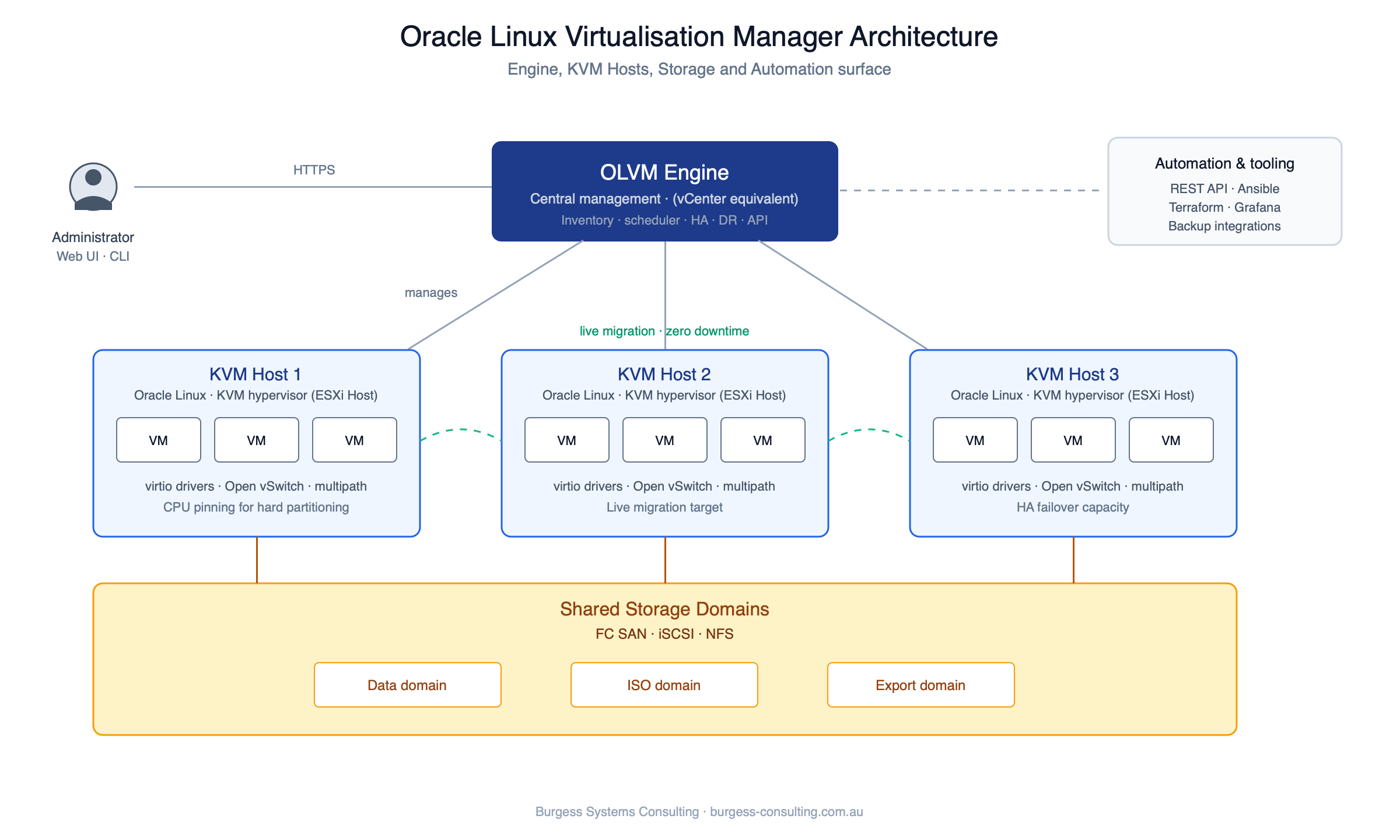
This post walks through the architecture of Oracle Linux Virtualization Manager: the main components, how they fit together, and how OLVM uses Oracle Linux and KVM (Kernel-based Virtual Machine). If you’re coming from VMware or Oracle VM, most of the concepts will be familiar.
Overview of OLVM
OLVM manages Oracle Linux KVM servers. It provides a web interface, REST API and Ansible modules for managing virtual machines (VMs), storage and networks.
OLVM allows for the deployment and monitoring of virtualised workloads, from small single server environments, through to very large enterprise deployments hosting thousands of virtual machines.
Whilst OLVM might not have all the bells and whistles of other products in the market, it provides all the functionality required from an enterprise class virtualisation platform. Part of the power of OLVM lies in its simplicity – it does what it needs to do extremely well – host and run mission critical apps and databases.

Key Components of OLVM
Management Engine
The heart of OLVM is its management engine, which is responsible for orchestrating all aspects of the virtualisation environment. It handles tasks such as VM lifecycle management, resource allocation, and scheduling.
The engine also provides a centralised point for configuring and managing storage and network settings.
The OLVM engine runs on an Oracle Linux server – either physical or virtual (on a different hypervisor if virtual). Alternatively, for OLVM clustered environments, the OLVM engine can be deployed as a “self-hosted” configuration running on the OLVM cluster that it manages.
Oracle Linux KVM
At the core of OLVM’s virtualisation capabilities is Oracle Linux KVM. KVM is a Linux kernel module that transforms Linux into a type-1 (bare-metal) hypervisor. Oracle Linux KVM extends standard KVM functionality with advanced features such as live migration, high availability, and dynamic resource management. The KVM host starts as an Oracle Linux server with a minimal install, after which the required KVM packages are installed.
Data Warehouse and Reporting
OLVM includes a data warehouse component that collects and aggregates data from the virtualisation environment. This data is then used by the reporting tool to generate detailed reports and insights covering resource allocation, performance and capacity planning. Grafana is now a supported reporting tool for the OLVM engine database.
User Interface and API
OLVM provides a web-based user interface that simplifies the management of the virtualisation environment. Administrators use it to create and manage VMs, configure networks and set up storage domains.
OLVM also offers a RESTful API (via Python SDK), and Ansible modules enabling automation and integration with external systems and applications. The OLVM web interface provides several portals: Administration, VM and Monitoring. The VM portal provides a simplified “self-service” interface for users to launch and stop VMs, the Monitoring portal directs to Grafana for dashboard reporting.
How OLVM Works
OLVM operates by interacting with Oracle Linux KVM servers through its management engine. Administrators can define VMs, including their hardware configurations, operating systems, and storage requirements, from the OLVM user interface or via API. The management engine then communicates with KVM hosts to deploy and manage these VMs, allocating resources as needed based on predefined policies and availability.
Storage in OLVM can be configured using various backends, including NFS, iSCSI, and Fibre Channel, allowing for flexibility in how data is stored and accessed.
Networking in OLVM supports standard configurations like bridged or NAT networks, as well as more complex setups involving VLANs and bonding. OLVM supports different networks for VM traffic, management and VM live migration traffic.
OLVM adopts a hierarchical configuration based around the concepts of a data centre, cluster, host and storage domain. One OLVM engine can manage multiple data centres, each data centre can have multiple clusters, and multiple storage domains.
OLVM can be configured as a cluster environment or as a stand-alone server.
For readers familiar with VMware vSphere or Oracle VM the concepts are very similar with how hardware resources are virtualised – the terminology and methods are slightly different between the hypervisors.
Benefits of OLVM
OLVM offers several key benefits, including:
Scalability
Single KVM host limits are 384 CPU cores, 6TB RAM with a max of 600 guests running concurrently on a single host (depending on workload of course). OLVM engine maxes out at 10,000 concurrently running virtual machines across 1,024 hosts. For the vast majority of on-premise workloads these limits should be high enough.
Flexibility
Suitable to use for single host with local storage deployments all the way up to large clusters with enterprise class SAN connectivity.
Wide range of guest operating systems supported including Oracle Linux, Red Hat Enterprise Linux, CentOS, SUSE Linux Enterprise Server, Ubuntu, Microsoft Windows Server 2012 through 2022, Microsoft Windows 8 through 11, and Oracle Solaris x86.
OLVM can be deployed on OCI bare metal infrastructure providing further flexibility on how and where workloads can be run.
Cost-effectiveness
OLVM is provided under the Oracle Linux Premier Plus Support subscription model which includes 24×7 enterprise class Oracle Linux Support. Considering the enterprise class features available in OLVM, the per physical host subscription cost provides very good value.
Integration
A wide range of Oracle templates can be deployed on OLVM reducing the time and effort involved with application provisioning.
OLVM virtual disk image format provides an easy on-ramp to migrating to OCI or co-existing in a hybrid cloud deployment.
Summary
OLVM doesn’t have every feature VMware has, but the architecture is simple: an engine, KVM hosts, storage domains and networks, managed through a web interface, REST API or Ansible. For running Oracle databases and applications, that covers what most estates need.
Building OLVM and something’s in the way?
Whether you’re designing the platform, building it or already running workloads on it, tell us what’s holding things up. Engine placement, storage domain design, network layout, or a cluster that won’t behave under load. In 30 minutes we’ll narrow down what’s causing it and give you practical next steps. If you’d rather we did the work, we can.
Talk through what’s holding you up