 Mark Burgess
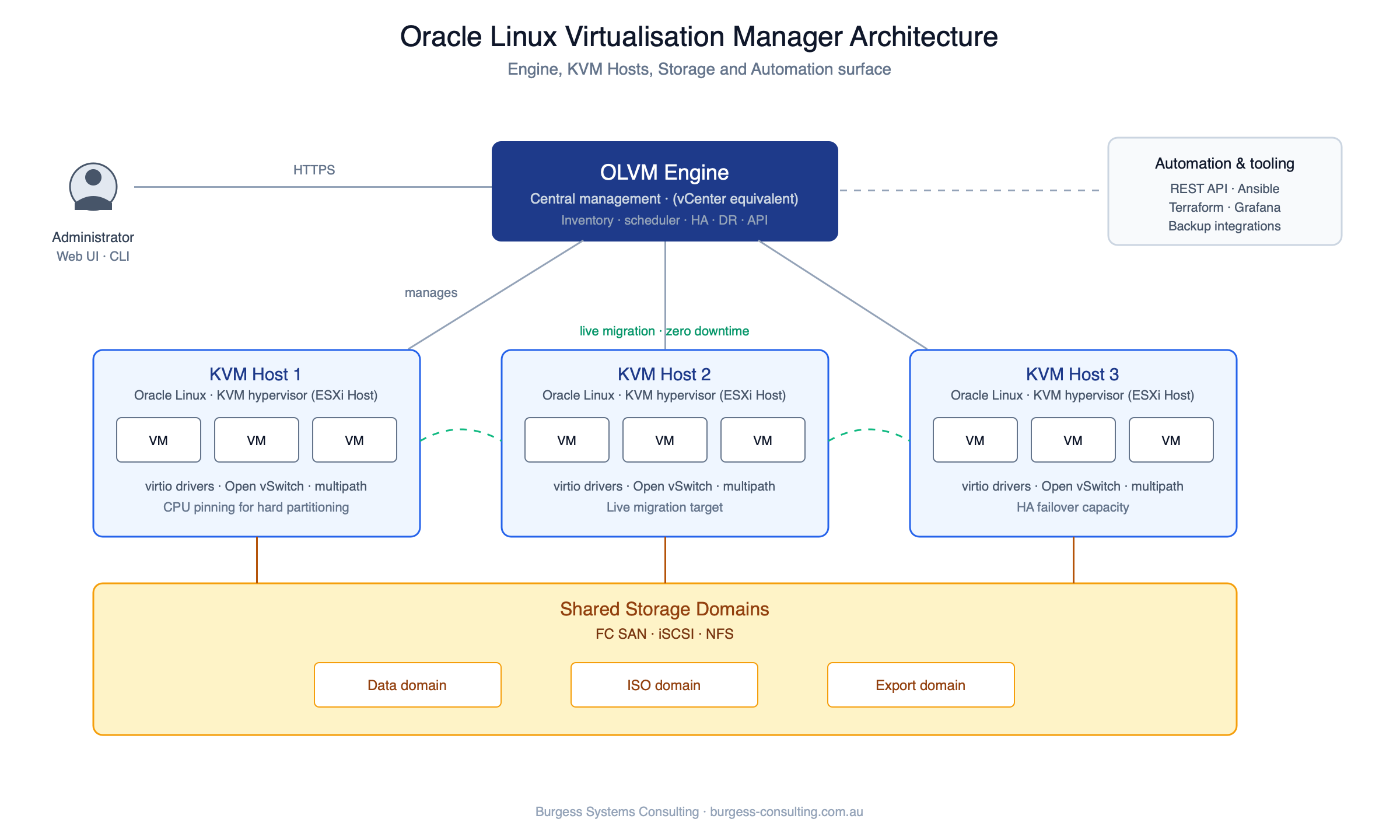
These lessons come from moving Oracle estates off Oracle VM and onto Oracle Linux Virtualization Manager – production, DR and non-production environments running Oracle Database and Oracle middleware, on the OVM 3 to OLVM 4 path that every remaining OVM customer is now on. If you’re new to OLVM, our architecture guide covers the Engine, KVM hosts and storage domains this post assumes you know.
Oracle’s documentation covers how the migration tooling works. It doesn’t cover how to plan and sequence a migration across a whole estate – that’s a site-specific exercise, and it’s where an OVM exit is most likely to go wrong. The problems we’ve run into have been about method, sequencing, and whether the target platform is ready when you need it. That’s what this post is about.
There’s No Supported Path Left
Oracle VM 3 left Premier Support in March 2021 and Extended Support in June 2024. Both dates are in Oracle’s Lifetime Support Policy for open source service offerings.
This is more absolute than most end-of-life situations. There’s no support tier left to buy. As an Oracle partner, we can’t sell OVM support to a customer who asks for it – there’s nothing to sell.
If you’re still running OVM, you know what that means in practice. No patches. No escalation path when a production node fails outside business hours. And it stays on the audit and risk register until it’s resolved.
None of that makes the migration so urgent that it justifies a bad plan. It does mean the question has moved from whether to when.
Understand That the Migration Is Repetitive, Not Complex
It’s easy to scope OVM to OLVM as a hard migration. It isn’t, and knowing that changes how you scope it.
The platforms are close enough that there’s no re-architecture, no application change, and no change to how the workload runs. What there is instead is a long sequence of fiddly steps – prerequisite configuration, guest preparation, transfer, target provisioning, target configuration, verification – repeated once for every VM you own.
That changes where the risk sits. The risk in a repetitive migration isn’t a wrong decision, it’s a missed step – one VM out of eighty where a prerequisite wasn’t applied or a setting was done slightly differently, and nobody notices until that workload behaves oddly weeks later. Drift like that is much harder to detect than a failed cutover, because nothing fails at the time.
The other cost is elapsed time. Setting up the prerequisites is slow in its own right, and doing it by hand for every VM is where manual approaches fall over – there are a lot of steps, and your team has a day job.
Prepare Your Guests Before Migration
If you’re running Oracle Linux guests on OVM, there’s a good chance they’re on older OL7 point releases. Ideally, replace them with OL8 guests and move the workload rather than the machine – OL7 is at end of life itself, and moving a guest to a new hypervisor while leaving it on an unsupported OS is half a job. Where that isn’t practical, patch each guest to the latest OL7 release before you migrate it. Either way it’s separate work, done before the migration starts, and it doesn’t belong in the migration automation. The reasons are the same ones that apply coming from VMware – the newer UEK carries the virtio and KVM optimisations OLVM is built around.
There’s a pattern here worth knowing about. The habit that leaves an estate on an unsupported hypervisor is usually the same habit that leaves the guests years behind on patching. If you’re still on OVM in 2026, find out what your guest OS levels actually are during scoping rather than three weeks into delivery – “rebuild on OL8 or patch OL7” changes the size of the whole project.
One more thing to check on multi-homed guests: virt-v2v can reorder the PCI devices during conversion, which on OL7 with the old ethN naming means eth1 and eth2 can swap. On most guests that’s a nuisance you fix after first boot. On a RAC node it puts the interconnect on the wrong interface and CRS won’t start. It’s fixable – the interface names can be pinned in the source guest before it’s converted – so validate interface naming on the first converted guest and, if it moves, fix it in the source guests before you run the rest.
Choose the Migration Method on VM Count
There are two ways to move a guest from OVM to OLVM. Both work. They’re not interchangeable once the estate gets past a handful of VMs, and choosing between them is the biggest technical decision in the project.
Export to OVA, then import. Export the VM from OVM as an OVA and import it into OLVM. This is the simpler method – fewer moving parts, one file per VM that you can see and check, and easy to explain to a team that hasn’t done this before. It’s also slow. Every byte gets written out to the OVA and then read back in on import, so each VM is handled twice with a file sitting in between. On a handful of machines that’s fine. Across an estate it isn’t, and elapsed time ends up driving your whole schedule.
Direct copy. Dump the VM’s libvirt definition from the OVM server, then run virt-v2v on a KVM host that can see the OVM repository. It reads the virtual disks straight off the repository and uploads them into an OLVM storage domain through the engine’s image upload API. We name the storage domains to match the OVM repositories so the mapping is one to one.
virsh -c xen+ssh://root@<ovm-server> dumpxml <vm-uuid> > exp_<vm>.xml

virt-v2v \
  -i libvirtxml exp_<vm>.xml \
  -o ovirt-upload \
  -oc https://<olvm-engine>/ovirt-engine/api \
  -os <storage-domain> \
  -op /tmp/.ovirt-admin-password \
  -of raw \
  -oo rhv-cluster=<cluster> \
  -oo rhv-cafile=/root/ca.pem
It’s much faster, and you can run several at once within what your infrastructure will take. Under the covers it’s a big file copy with orchestration around it, and it behaves like one – if a VM is taking longer than the one next to it, think disk size, network path, and what else is using the storage.
OVA export feels safer because less is happening at once, and on a small estate it’s the right call. On a large one it isn’t – the extra elapsed time is what leaves a migration half done when the change freeze lands.
Check the output disk format before you start moving guests. virt-v2v will write raw disks unless you tell it otherwise, and if you’re using Veeam for VM-level backup you need qcow2 for incremental backups to work. Converting after the fact is slow. Decide up front. The example above writes raw. On that estate the Veeam requirement only surfaced after non-prod had already been migrated, and rather than change the output format partway through, production went across as raw and the disks were converted to qcow2 afterwards on OLVM. It worked, but it’s extra work you’d rather not have.
Know What the Numbers Look Like
With direct copy, we’ve measured around 20 minutes end to end for a VM with about 200GB of virtual disk. It’s a file copy, so the time scales with disk size – treat it as a rate rather than a fixed number.
This is a cold migration. The source VM is shut down before the copy starts and the target isn’t started until the copy and post-configuration are done, so each workload is off for the copy time plus first boot and checks – for a 200GB VM, plan on an hour rather than twenty minutes, and schedule application outages on that basis. There’s no live path between OVM and OLVM.
We’ve run three migrations at a time through a single KVM host without any trouble. Three was a working choice rather than a measured limit – it was enough to finish inside the windows available, so we didn’t push to find the ceiling. If you’re moving a large estate, that test is worth doing before you commit to dates. The copy runs through a process on the KVM host, so that host is reading from the source repository and writing to the target storage domain over the network at the same time. If your storage is NFS or iSCSI, both directions are competing on the same path through the same host. How many you can run concurrently depends on what that path will carry, not on anything in OLVM – and if you want more throughput, the first place to look is the network in and out of the host doing the work.
Eighty VMs at twenty minutes each, three at a time, is about nine hours of copying. That’s the migration. Everything else in an OVM exit – preparation, platform work, verification – is where the time and the risk actually sit, and that’s the part to plan properly. Put weeks against the rest, not hours. Design for an estate of that size is a couple of weeks of work. Building and commissioning the platform takes longer and is the part most likely to run over. The automation has to be built and proven on a handful of representative VMs – a single-instance database, a RAC node, a middleware server – before the schedule can be trusted. If the guests need patching or rebuilding, that’s a separate stream that starts first. The copying is a few evenings; the project is measured in months.
Commission the Target Platform as Its Own Project
The problems we’ve hit have been on the target platform before the first guest moved, not in the conversion itself. A migration plan assumes the destination works. When it doesn’t, every date after it moves, and it moves at the point where you’ve got the least room.
Validate the whole platform before you migrate anything onto it – not just the storage. That means storage, network, performance and failover behaviour, and it means exercising the standard hypervisor operations you’ll be relying on every day: snapshot create and remove, VM cloning, storage migration between domains, live migration between hosts, host maintenance mode and the HA restart of a VM when a host goes down. Do each of them on their own first. Then do them under load – several at once, with sustained I/O running across the storage domains at about the level three concurrent migrations would generate – and make sure they complete cleanly and repeatably.
Running them under scaled load is the part that gets skipped, and it’s the part that matters. A single operation on an idle platform will pass on an environment that falls over when three migrations, a snapshot and a live migration are all in flight at once. Load testing exercises the infrastructure underneath – the storage path, the network path, the hosts – but it also exercises the OLVM Engine itself, which is orchestrating all of it and which your team probably hasn’t run under load before. You want to find out how the Engine behaves under concurrent operations before your migration schedule depends on it.
Storage and network misconfiguration are the two things most likely to blow out a migration timeline, and they’re the two things a new platform is most likely to have. An NFS export option, a multipath setting, an MTU mismatch on a storage VLAN, a bond that fails over the wrong way – none of these show up on an idle platform, and when they do show up under load they often don’t fail cleanly. They hang, or they slow down, or they work for a while and then stop. That kind of fault gives you nothing to search for, and because the migration tooling is new and the storage and network have been running for years, the tooling gets blamed first and days get spent troubleshooting the wrong layer. A proper commissioning phase finds these problems while they’re still a platform issues.
The hardware question comes up early: can the OVM hosts be reused as OLVM hosts? Usually yes – they’re x86 servers and OLVM’s requirements are ordinary – but not while they’re still running OVM guests. You need enough target capacity to commission the platform and run the first waves while the source is still live. That means either new hardware for the target, or a staged plan that frees a host, rebuilds it as a KVM host and moves capacity across in steps. The staged version works, and we’ve planned migrations around it, but it adds a step to every wave and it’s the first thing to drop if new hardware turns up. Settle this before you commit to dates.
Give platform commissioning its own line in the plan with its own exit criteria, whoever is building it, and don’t schedule the migration to start until those criteria are met.
Stabilise first, migrate second.
Automate the Repetition
We run the per-VM migration as an Ansible job from Oracle Linux Automation Manager, on the KVM host doing the work. “We automated the migration” can mean almost anything, so this is what the job covers.
For each VM it looks up the VM, its vNICs and the repository its disks are on from the OVM manager; starts the source if it isn’t already running (a stopped VM has no libvirt definition on the OVM server to dump); dumps the definition; shuts the source down cleanly and waits until OVM confirms it’s stopped; runs virt-v2v as shown above; and then, through the OLVM REST API, renames the new VM from its imported UUID to its proper name, sets the display to VNC, turns memory ballooning off and sets maximum memory equal to allocated memory, and puts each NIC on the right OLVM network by matching MAC addresses against a source-to-target network map. Credentials come from the customer’s password vault at run time – nothing is stored in the playbook.
That’s where it stops, deliberately. You get a fully configured, powered-off VM on OLVM. First boot, checking the guest came up cleanly, validating the application, and the database-specific settings – CPU pinning for licensing, the High-Performance profile, and the HA and lease settings that keep OLVM out of Clusterware’s way – are done by a person, per VM, watching the console. The source VM is left stopped on OVM rather than deleted, so rolling back any VM is a matter of starting it again.
The CPU pinning is worth calling out. If your Oracle licences are counted on a subset of cores, the OLVM design has to reproduce that under Oracle’s hard-partitioning rules before any database VM moves – it’s a design input. Your contractual position is something to confirm with Oracle or a licensing specialist.
None of the individual steps are hard. We automate for three reasons.
Consistency. A good team following a good runbook will get most VMs right. But across dozens of VMs, with different people working different windows, there’s always the chance that a step gets done slightly differently or skipped on one of them – and that shows up later as unexplained behaviour on a machine that’s supposed to be identical to its neighbours. Automation takes that possibility off the table. The last migration is done exactly the same way as the first, which matters most on the machines nobody’s watching closely – the non-prod and DR guests that get less attention at cutover and then misbehave when you finally need them.
Concurrency. This is what makes direct copy pay off. A manual process is limited by how many engineers you’ve got and how long they can concentrate on a repetitive task late in a change window. An automated one is limited by infrastructure, which you can measure and, if you need to, buy more of.
Handover. The automation stays with the customer and keeps working after the project ends. A runbook doesn’t, and the engineer who wrote it usually isn’t around either.
Decide Who Runs the Migration
There’s no single right answer to who does the execution, and it’s one of the first things to settle in scoping because it changes what the plan looks like.
If you don’t have a platform team, or they’re committed elsewhere, the migration gets delivered end to end – design, target platform build and commissioning, automation, execution, cutover and decommission – with your people involved at verification and sign-off. That’s the fastest option with the fewest hand-offs.
If you have a capable platform team that will be running the estate afterwards, the split that works well is to bring in the design, the platform work and the automation, and keep the execution in-house. Your team runs the migration on your platform with the automation in their hands, and the operational knowledge ends up with the people who’ll need it. For an estate they’ll be running for the next decade that’s a real benefit – but only if they’ve got the time to do it properly alongside the day job, so be honest about that before you choose it.
A split that works well in practice is somewhere in between: the first wave delivered, the rest run by your team once they’ve seen it done. Either way, the automation stays with you.
The Bottom Line
An OVM exit is a repetitive migration, onto a platform you haven’t proven yet, from guests that may be further behind than you think.
Check your guest OS levels before you scope. Prove the whole target platform – storage, network, failover and the everyday hypervisor operations – under concurrent load before you commit to dates. Pick the migration method on the size of the estate rather than on what feels safest, and automate the repetition – because the repetition is where the risk actually is.
The copying is a few evenings. The preparation is the project.
If you’re still weighing OLVM against the alternatives before you commit to the exit, our OLVM vs VMware comparison covers the platform side – what it does well, where it falls short, and the Oracle licensing position.
Moving off Oracle VM and something’s in the way?
Whether you’re still scoping or partway through, tell us what’s holding things up. Guests stuck on old OL7 releases, choosing between OVA export and direct copy, a target platform that won’t behave under load, or automating the move across the whole estate. In 30 minutes we’ll narrow down what’s causing it and give you practical next steps. If you’d rather we did the work, we can.
Talk through what’s holding you up