 Mark Burgess
Oracle Cloud Infrastructure’s burstable compute instances offer a powerful way to reduce costs for workloads that don’t consistently require peak CPU performance. By analysing our actual usage patterns and implementing burstable instances where it made sense, we achieved a saving of approximately 50% on our OCI compute service costs. This was done with no impact to service performance or modifying workloads.
Understanding the Problem
When provisioning compute instances, it is easy enough to accept the defaults and configure based on whole OCPU’s to match your peak resource requirements. In reality this can lead to significant over-provisioning and paying for capacity that is going idle in many cases. In our environment, we discovered that instances configured for peak CPU usage were actually running under 50% utilisation most of the time, with only brief daily peaks during specific operations like backups, batch processing, or periodic maintenance tasks.
This over-provisioning becomes particularly expensive with licensed software like Windows Server, where you pay for both the infrastructure and software licensing based on the full instance allocation.
Identifying Candidates with Checkmk
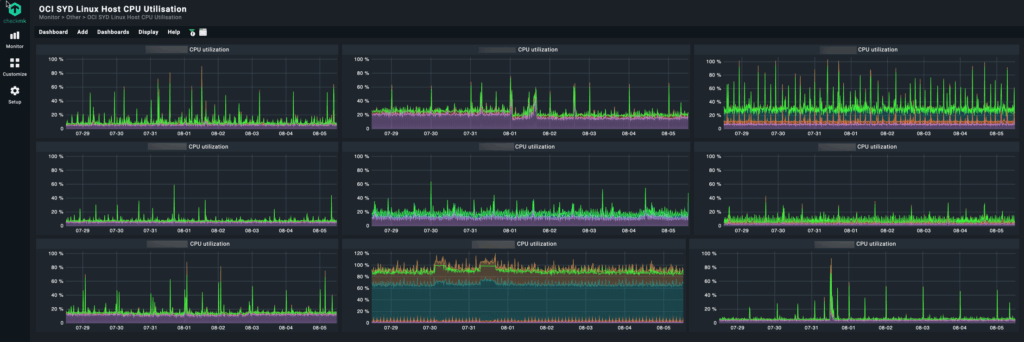
The first step in implementing burstable instances is identifying which workloads are good candidates. We used Checkmk, our existing monitoring platform, to analyse CPU utilisation patterns across our entire OCI fleet.
Using Checkmk’s dashboards we are able to quickly view CPU utilisation across multiple hosts:
OCI Compute Instance Configuration
Once we had identified instances that were good candidates for burstable, the instance config is updated in the OCI console:

Note, under “Shape configuration” there is no “Burstable baseline” setting.

Make the change to the instance shape – you need to expand the shape drop down option to see the “burstable” toggle.

For this instance we chose 50% for the burstable config. While the instance averaged 12% utilisation, it has occasional peaks up to 70% that we had to service. Keeping at 50% instead of 12% burstable gives that instance most of its 70% peak whereas configuring a 12% reservation would run the risk that the service would stall if the CPU could not burst.

You need to reboot the instance for burstable to take effect.

Cost Savings
This is the cost savings we have realised for this instance since configuring burstable on the 18th July:

Following is the reduction in overall compute service costs after applying burstable:

Caveats
A couple of things to be aware of with burstable:
- Burstable capacity is on-demand – there are no guarantees that your instance will get CPU beyond the burstable baseline.
- The instance CPU will burst up to the OCPU limit for up to 1 hour at a time.
Additional constraints to be aware of are documented in the OCI Compute Burstable Instances OCI documentation.
For non-prod and DR systems this is an easy cost win, for production carefully analyse your workload requirements and how burstable works before configuring.
Results
Implementing OCI burstable instances delivered significant cost savings while maintaining performance for our typical workloads. The key to success was thorough analysis using Checkmk to identify suitable candidates and careful implementation with ongoing monitoring.
For organisations running workloads with variable CPU requirements, burstable instances represent a practical way to optimise cloud costs without sacrificing performance.
Start with your monitoring data, identify the right candidates, and implement gradually. The cost savings compound quickly across multiple instances while maintaining the performance your applications require.